Mermaid 12: What Changed and How to Keep Your Old Layout
By Alee Hamza · Updated
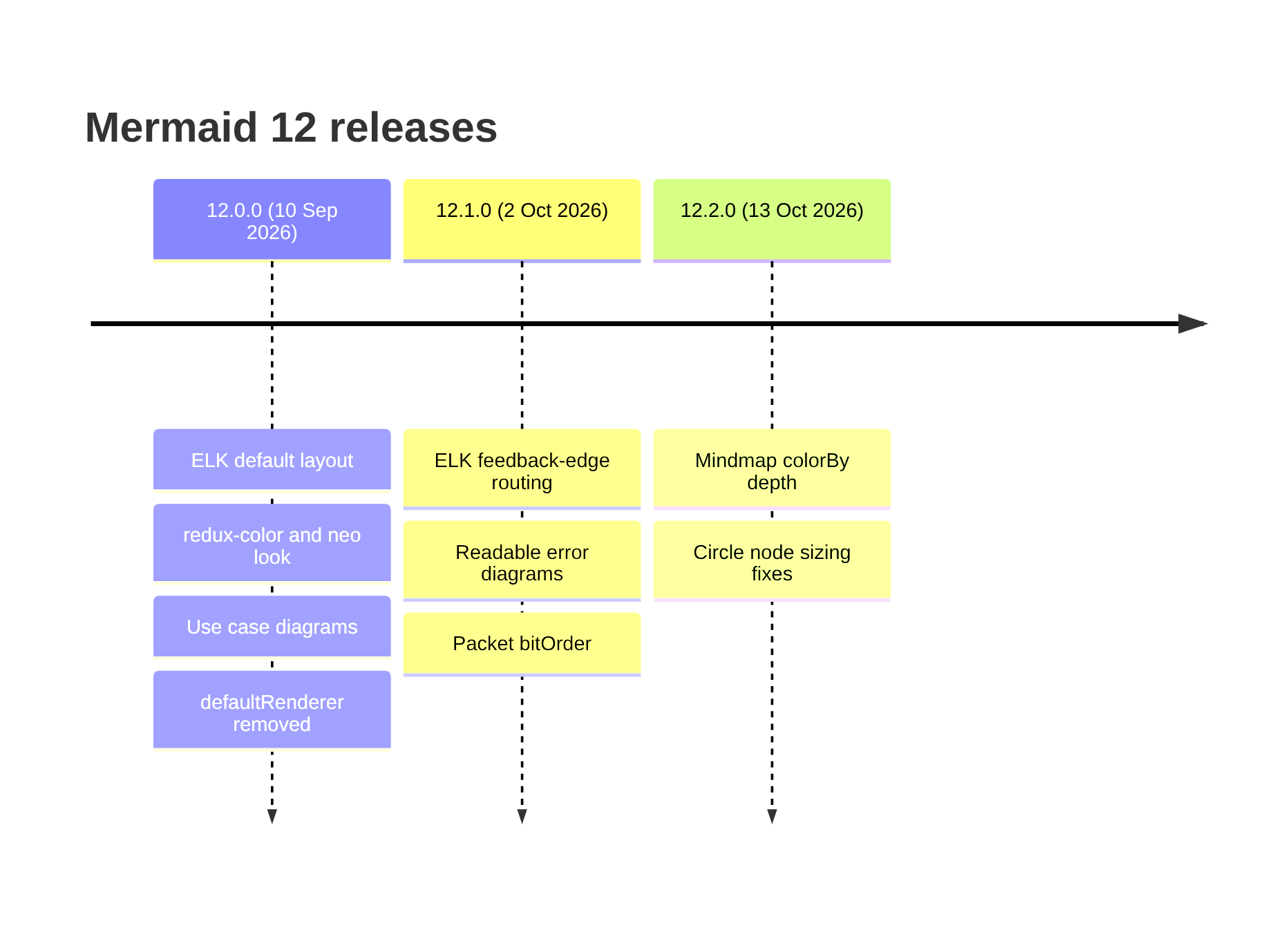
TL;DR: Mermaid 12.0.0 shipped on 10 September 2026. Flowcharts, state,
class, ER and requirement diagrams are now laid out by ELK instead of
dagre, and the default appearance changed, so existing diagrams re-lay out and recolour. To
keep the old look, add layout: dagre, theme: default and look: classic to your config. defaultRenderer is gone; use layout.
What changed, at a glance
| Change | Affects | Breaking? |
|---|---|---|
| ELK is the default layout | Flowchart, state, class, ER, requirement and use case | Yes |
| New default look (redux-color, neo) | Every themed diagram | Yes |
| defaultRenderer removed | Configs that set it | Yes |
| ES2024, Safari 17.4+, Node 22.12+ | Sites supporting older browsers | Yes |
| Use case diagrams | New diagram type | No |
| Per-diagram theme, look and layout | Config | No |
| </br> accepted as a line break | Labels | No |
Everything here comes from the official release notes for 12.0.0, 12.1.0 (2 October 2026) and 12.2.0 (13 October 2026).
ELK is now the default layout
Mermaid has always drawn flowcharts with dagre, a layered layout engine. ELK (the Eclipse Layout Kernel) was available before, but only if a site
installed the separate @mermaid-js/layout-elk package and registered it. In Mermaid
12, ELK is bundled and used by default for flowchart, state, class, entity relationship, requirement
and use case diagrams that do not name a layout.
ELK usually produces straighter edges and tidier subgraphs, but it places nodes differently, so any diagram that relied on dagre’s layout will move. Mind maps are the exception: they keep their own layout unless you ask for another.
A few details from the release notes worth knowing:
- The ELK variants
elk.stress,elk.force,elk.mrtree,elk.sporeOverlap,elk.boxandelk.rectpackingnow work with no setup, and a single subgraph can choose its own with@{ algorithm: … }. - Sites that load the one-file
mermaid.min.jsbuild grow by roughly 500 kB gzipped, because ELK is inlined. The ESM build loads ELK only when a diagram uses it, and the tiny build leaves it out and falls back to dagre. @mermaid-js/layout-elkis no longer needed. ExistingregisterLayoutLoaders(elkLayouts)calls keep working and can be removed.- Since 12.1.0, ELK routes an edge that feeds back into a subgraph downstream instead of
around it. That changes some ELK layouts again;
elk.orientFeedbackEdges: falserestores the 12.0 routing.
A new default look
The default appearance moved to the redux-color theme and the neo look, so diagrams that never set a theme change colour as well as shape.
Under redux-color, class boxes, subgraphs and composite states each get their own
colour from a 12-colour palette, as ER entities already did.
One quieter change: an unrecognised theme name now falls back to the default theme
completely. Before, the bad name stayed in place while the default colours loaded, which broke
palette-aware styling.
How to keep your old diagrams exactly as they were
Three settings undo the visible changes. Put them in the diagram’s front matter to fix one diagram:
---
config:
  layout: dagre
  theme: default
  look: classic
---
flowchart LR
    A[Order placed] --> B{In stock?}
    B -->|Yes| C[Ship]
    B -->|No| D[Back-order]
Or set them once for every diagram on your site:
mermaid.initialize({
  layout: 'dagre',
  theme: 'default',
  look: 'classic'
});
All three options also work on Mermaid 11, so a diagram that sets them looks the same whichever version renders it. That matters because platforms upgrade on their own schedule: your laptop, your docs site and GitHub may not run the same Mermaid for a while.
defaultRenderer is gone
The defaultRenderer option in the flowchart, class and state config sections has been removed. All of its values had come to select
the same renderer, and its elk value only set layout: elk for you. Replace
this:
---
config:
  flowchart:
    defaultRenderer: elk
---
with this:
---
config:
  layout: elk
---
Related: the legacy flowchart, class and state diagram ids are gone too. If your code checks the type Mermaid detects, expect flowchart-v2, classDiagram and stateDiagram. Writing graph or flowchart-elk as the first line still works.
Newer browsers and Node versions only
Mermaid 12 targets ES2024 and Safari 17.4 or later, and declares Node.js 22.12 or later. If
your site supports older browsers, you will need to transpile or polyfill Mermaid, or stay
on 11. Bundlers that import the mermaid package are unaffected by a related
change; only builds that point Vite directly at dist/mermaid.esm.min.mjs need to
switch.
What is new
- Use case diagrams: UML use case diagrams with actors, use cases, system boundaries, relationships and notes. See the use case syntax.
- Theme, look and layout per diagram type. One site can draw flowcharts hand-drawn and everything else classic:
mermaid.initialize({
  look: 'classic',
  flowchart: { look: 'handDrawn' }
});</br>as a line break in labels, alongside<br>.- Readable error diagrams (12.1.0). When a diagram fails to parse, the error image now shows the real message under “Syntax error in text”. Once hosts that only display the SVG, such as GitHub and Obsidian, run 12.1 or later, they will no longer hide what went wrong.
- Packet diagrams gained a
bitOrderoption (12.1.0), and mind maps can be coloured by depth withmindmap.colorBy: depth(12.2.0). - Faster parsing of deeply indented diagrams and of diagrams with large front matter.
Which version is your platform running?
Render a diagram that contains only info. Mermaid draws its own version number,
which is the quickest way to find out what GitHub, GitLab, Obsidian or your documentation
site actually uses:
```mermaid
info
```
At the time of writing, TryMermaid’s editor runs Mermaid 11.17.2, so diagrams you make here
use the classic dagre layout unless a diagram sets layout: elk. Adding the
three settings above is still worthwhile: it makes the diagram look the same wherever it is
rendered.
Should you upgrade?
If you render Mermaid yourself, yes, but plan for it. Upgrade, add the three settings to your global config, and check your most important diagrams; then remove the settings one at a time where you prefer the new look. If you only write Mermaid for GitHub or a hosted tool, there is nothing to install: the platform decides, and the settings in your front matter keep your diagrams stable when it does. If a diagram breaks after an upgrade, the Mermaid validator shows the exact line.
Frequently asked questions
When was Mermaid 12 released?
Mermaid 12.0.0 was released on 10 September 2026. Version 12.1.0 followed on 2 October and 12.2.0 on 13 October 2026.
Why do my Mermaid diagrams look different?
Two defaults changed. Flowchart, state, class, ER, requirement and use case diagrams are now laid out by ELK instead of dagre, and the default appearance moved to the redux-color theme and neo look. Diagrams that do not set a layout, theme or look pick up the new defaults.
How do I get the old Mermaid layout back?
Set layout: dagre, theme: default and look: classic in the diagram’s front matter, or pass the same three options to mermaid.initialize. Those settings also work on Mermaid 11, so the same diagram looks the same on both versions.
What replaced defaultRenderer?
It was removed. Use the top-level layout option instead: layout: dagre or layout: elk. Its old values all selected the same renderer anyway.
How do I find out which Mermaid version a site uses?
Render a diagram containing only the word info. Mermaid draws its own version number, which tells you what GitHub, GitLab, Obsidian or your docs site is actually running.