How to Generate Mermaid Diagrams with Claude
By Alee Hamza · Updated
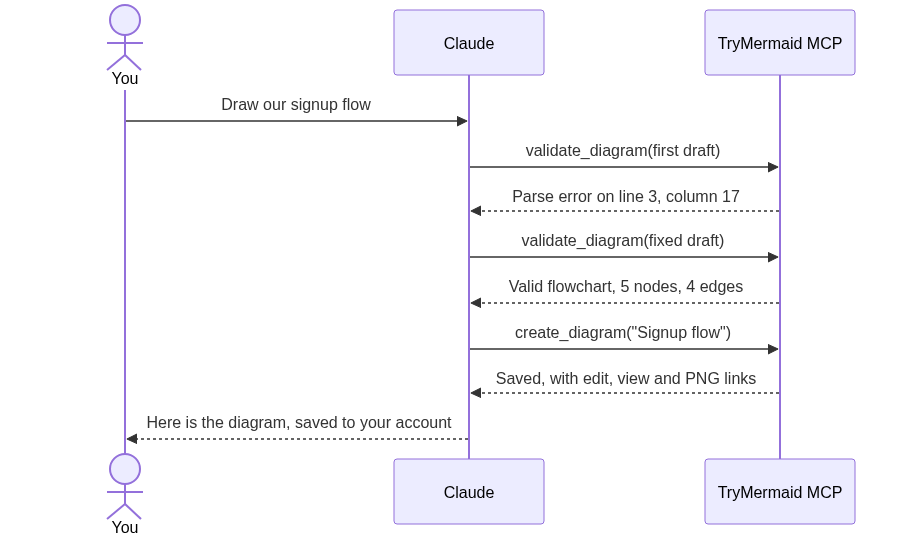
TL;DR: Claude can write Mermaid with no setup, and claude.ai will render it. What it cannot do on its own is check the code against the real Mermaid parser, save the diagram anywhere, or hand you an image link. A Mermaid MCP server adds those. The free options are the official Mermaid Chart connector and the open-source claude-mermaid; ours saves diagrams to an account you can edit by dragging shapes, and costs $9 a month.
Disclosure: TryMermaid makes one of the MCP servers in this guide. The free alternatives are covered too, because for many people they are the better fit.
Option 1: just ask Claude, no setup
Mermaid is a text syntax for diagrams, and Claude writes it well. Ask for “a Mermaid flowchart of our signup process” and you get code back.
On claude.ai and Claude Desktop, Claude can show that code as a rendered artifact, so you see the diagram in the conversation. In Claude Code you get the code only: Claude Code does not render Mermaid in the terminal, and there is an open feature request for it. You paste the code into an editor to see it.
For a one-off diagram, that is often all you need. The gaps show up when you use it regularly:
- Claude writes Mermaid from memory and sometimes gets the syntax wrong.
- The diagram lives only in the conversation.
- There is no image or share link to drop into a doc or a pull request.
Seeing diagrams from Claude Code
Because Claude Code prints Mermaid as text, there are three ways to see the diagram without leaving your workflow:
- A preview server. claude-mermaid (below) opens the diagram in your browser and refreshes it as Claude edits.
- Links instead of pictures. An MCP server that returns view and image links, such as ours, gives you something to click in the terminal.
- Paste it somewhere. Copy the code into the Mermaid validator, which draws it and points at the exact line of any error.
What an MCP server adds
MCP, the Model Context Protocol, is the standard that lets Claude call tools while it works. A Mermaid MCP server is a set of those tools for diagrams. The most useful one is validation: Claude sends its draft to the real Mermaid parser, gets back the exact error if there is one, fixes it, and only then shows you the result.
A live run against the real parser
We asked for a signup flowchart and watched the tool calls against our live server on September 18, 2026. This is the real input and output.
The first draft contains the most common mistake in AI-written Mermaid: parentheses inside a node label.
flowchart TD
    A[User submits signup form] --> B{Email valid?}
    B -->|No| C[Show error (inline)]
    B -->|Yes| D[Create account]
    D --> E[Send verification email]
trymermaid_validate_diagram rejected it:
Invalid Mermaid syntax.

Error: Parse error on line 3:
...->|No| C[Show error (inline)]    B -->|
-----------------------^
Expecting 'SQE', 'DOUBLECIRCLEEND', 'PE', '-)', 'STADIUMEND',
'SUBROUTINEEND', 'PIPE', 'CYLINDEREND', 'DIAMOND_STOP', 'TAGEND',
'TRAPEND', 'INVTRAPEND', 'UNICODE_TEXT', 'TEXT', 'TAGSTART', got 'PS'
The structured result gave line 3, column 17. The caret points at the
opening parenthesis; PS is Mermaid’s name for it. Mermaid reads ( as the start of a rounded shape, so the label has to be quoted.
The corrected draft passed as a valid flowchart with 5 nodes and 4 edges:
flowchart TD
    A[User submits signup form] --> B{Email valid?}
    B -->|No| C["Show error (inline)"]
    B -->|Yes| D[Create account]
    D --> E[Send verification email]
trymermaid_create_diagram then saved it as “Signup flow” and returned an edit link,
a view link and a PNG image URL. Here is the saved diagram:
Rendering preview…
Without the validation step, that first draft is the one you would have been handed, and you would have been the one debugging it.
The Mermaid MCP servers you can use
| Server | Runs | Saves diagrams | Cost |
|---|---|---|---|
| Mermaid Chart connector | Remote; in Claude’s connector directory | Yes, to a Mermaid Chart account | Renders without sign-in |
| claude-mermaid | Locally, for Claude Code | To files on your machine | Free, MIT |
| TryMermaid MCP | Remote; any MCP client | Yes, to a TryMermaid account | $9/mo (Pro) |
There are more than these three; we compare five of them, including the open-source mcp-mermaid and a validator-only server, in Mermaid MCP servers compared.
The Mermaid Chart connector (Mermaid Chart has since been renamed mermaid.ai) is the official option from the Mermaid team and the easiest to add, because it is listed in Claude’s directory. It validates and renders diagrams in an interactive widget, and its tools include saving, updating and repairing diagrams. Sign-in is not required to render.
claude-mermaid is a free, open-source server for Claude Code. It opens a
live preview in your browser that refreshes as Claude edits, and saves SVG, PNG or PDF to a
path you choose. Install it with npm install -g claude-mermaid.
The TryMermaid MCP server makes most sense when you want diagrams to land in an account and then be edited by hand. Everything Claude saves opens in the TryMermaid editor, where flowcharts can be rearranged on a drag-and-drop canvas. When Claude later updates a diagram, shapes you placed by hand stay where you put them. It requires Pro at $9 a month.
Set up the TryMermaid MCP server
The server address is https://trymermaid.app/mcp. claude.ai signs you in
through your browser; the other clients use an API key, which you create in your dashboard under MCP connectors. The key is
shown once, so copy it straight into your client. The MCP server docs list every tool's inputs and outputs.
claude.ai and Claude Desktop
- Go to Customize → Connectors.
- Click +, then Add custom connector.
- Paste
https://trymermaid.app/mcpand click Add. - Sign in to TryMermaid in the window that opens and approve access.
No key is needed: the connector uses OAuth. Custom connectors are available on every Claude plan; Free plans are limited to one. You can disconnect it from your dashboard at any time.
Claude Code
Run this in your project, replacing the key:
claude mcp add --transport http trymermaid https://trymermaid.app/mcp \
  --header "Authorization: Bearer tm_live_YOUR_KEY"
To make it available in every project rather than just this one, add --scope user:
claude mcp add --transport http --scope user trymermaid https://trymermaid.app/mcp \
  --header "Authorization: Bearer tm_live_YOUR_KEY"
Cursor
Add this to ~/.cursor/mcp.json for all projects, or .cursor/mcp.json for one, and set the TRYMERMAID_API_KEY environment variable so the key stays out of the file:
{
  "mcpServers": {
    "trymermaid": {
      "url": "https://trymermaid.app/mcp",
      "headers": {
        "Authorization": "Bearer ${env:TRYMERMAID_API_KEY}"
      }
    }
  }
}
VS Code
Add this to .vscode/mcp.json. Note the top-level key is servers, not mcpServers as in the other clients. VS Code asks for the
key the first time it connects and stores it securely:
{
  "inputs": [
    {
      "type": "promptString",
      "id": "trymermaid-key",
      "description": "TryMermaid API key",
      "password": true
    }
  ],
  "servers": {
    "trymermaid": {
      "type": "http",
      "url": "https://trymermaid.app/mcp",
      "headers": {
        "Authorization": "Bearer ${input:trymermaid-key}"
      }
    }
  }
}
The nine tools
| Tool | What it does |
|---|---|
trymermaid_validate_diagram | Checks code against the real Mermaid parser and returns the exact error, line and column |
trymermaid_preview_diagram | Returns edit, view and embed links plus a PNG image URL, without saving |
trymermaid_create_diagram | Validates, then saves a new diagram to your account |
trymermaid_update_diagram | Edits a saved diagram, keeping any shapes you placed by hand on the canvas |
trymermaid_list_diagrams | Lists your saved diagrams, with an optional title filter |
trymermaid_get_diagram | Reads a saved diagram’s code and links |
trymermaid_delete_diagram | Deletes a diagram; marked destructive, so clients ask before running it |
trymermaid_list_diagram_types | Lists the diagram types and what each is for |
trymermaid_get_diagram_type | Returns the syntax table and a worked example for one type |
Prompts that work well
- “Draw our checkout flow as a Mermaid flowchart, validate it, and save it as Checkout.”
- “List my diagrams, then add a password-reset branch to Signup flow.”
- “Which Mermaid diagram type suits a release history? Show me its syntax.”
- “Give me a PNG link for this sequence diagram without saving it.”
Naming the diagram type helps more than any other wording. If you are not sure which type fits, the guides to sequence diagrams, timelines and Git graphs show what each one is for and the syntax Claude should produce.
Asking Claude to validate before it answers is worth doing even with no MCP server at all: it makes Claude read its own code more carefully. With a server, the check is done by the real parser instead.
When you do not need any of this
If you make an occasional diagram on claude.ai and are happy to copy the code somewhere, the built-in rendering is enough; paste it into an editor when you need to export it as a PNG. If you only want to see diagrams while you code, claude-mermaid is free and does that well. An MCP server that saves to an account earns its place when diagrams are something you come back to: editing them later, sharing them, or keeping them in one place.
Frequently asked questions
Can Claude generate Mermaid diagrams without an MCP server?
Yes, with no setup. Ask Claude for a Mermaid diagram on claude.ai and it can render it as an artifact. Claude Code cannot render Mermaid in the terminal, so there you copy the code into an editor, or add an MCP server that returns a link and an image.
What does a Mermaid MCP server do?
A Mermaid MCP server gives Claude tools to call while it works. Depending on the server, that means checking syntax against the real Mermaid parser, rendering an image, saving the diagram to an account, or reading and editing diagrams you saved earlier.
Which Mermaid MCP servers are there?
There are several. The official Mermaid Chart connector is in Claude’s connector directory and renders diagrams without sign-in. claude-mermaid is a free, open-source server for Claude Code with a live browser preview. The TryMermaid MCP server saves diagrams to an account you can then edit on a drag-and-drop canvas, and requires the $9 a month Pro plan.
How do I add the TryMermaid MCP server to claude.ai?
On claude.ai and Claude Desktop, go to Customize, then Connectors, click +, choose Add custom connector and paste https://trymermaid.app/mcp. You sign in and approve access in the browser; no key is needed. Custom connectors are available on every Claude plan, and Free plans are limited to one.
Why does Claude sometimes produce broken Mermaid?
Claude writes Mermaid from what it learned in training, so it sometimes produces syntax the parser rejects. A common case is parentheses inside a node label, such as C[Show error (inline)], which Mermaid reads as the start of a shape. A validation tool reports the exact line and column so Claude can fix it before you see it.