Mermaid MCP Servers Compared
By Alee Hamza · Updated
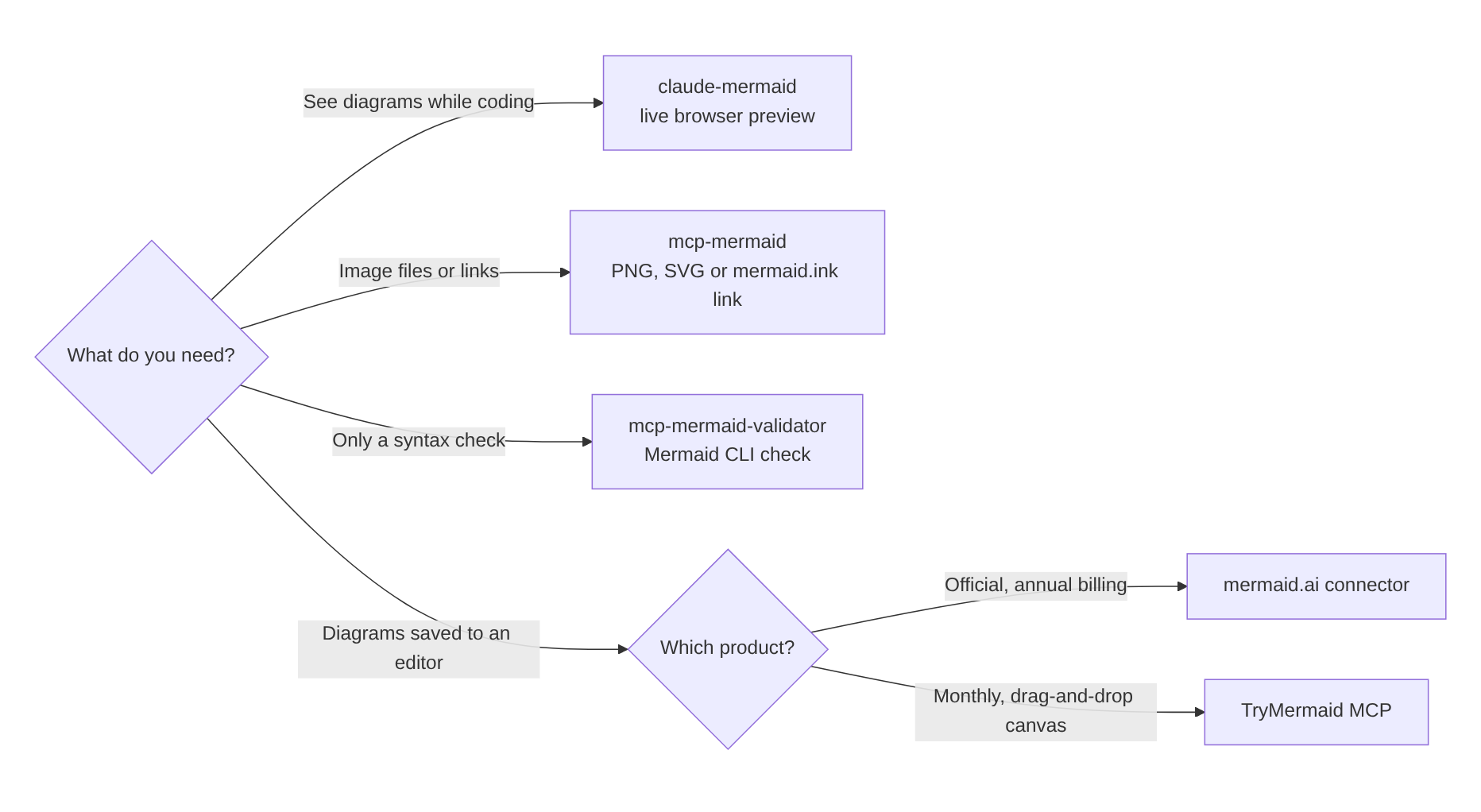
TL;DR: To see diagrams while you work in Claude Code, install claude-mermaid. To get image files or links from any AI agent, use mcp-mermaid. To add only a syntax check, use mcp-mermaid-validator. To have diagrams saved to an online editor, use the official mermaid.ai connector or TryMermaid. The first three are free and open source.
Disclosure: TryMermaid makes one of these five servers. The other four are judged on the same terms, and for many people one of them is the better choice.
Why use a Mermaid MCP server at all
AI assistants write Mermaid well, but from memory. Without a tool they cannot check the code
against the real parser, so a label like C[Show error (inline)] reaches you broken.
They also cannot show you the diagram in a terminal, or put it anywhere you can find it later.
MCP, the Model Context Protocol, is how Claude, Cursor, VS Code and other clients call tools. A Mermaid MCP server gives the model some combination of four abilities: validate, render, preview and save. No two servers offer the same mix, which is what this comparison is about.
The five servers at a glance
| Server | What it does | Where it runs | Cost |
|---|---|---|---|
| mermaid.ai (official) | Generates, validates and renders; saves to mermaid.ai | Hosted; in Claude’s connector directory | Renders without sign-in; saves to a mermaid.ai account |
| claude-mermaid | Live browser preview; saves SVG, PNG or PDF | Locally, mainly for Claude Code | Free, open source |
| mcp-mermaid | Renders to base64, SVG, PNG file or mermaid.ink link | Locally (stdio) or as an SSE/HTTP service | Free, open source |
| mcp-mermaid-validator | Validates with the Mermaid CLI and returns a PNG | Locally (stdio) | Free, open source |
| TryMermaid | Validates, previews and saves to an editable account | Hosted; any MCP client | $9/month (Pro) |
1. mermaid.ai: the official connector
mermaid.ai is the commercial product from the Mermaid.js team, formerly called Mermaid Chart. Its home page says its MCP server lets you “generate, validate, and render diagrams straight from Claude, VS Code, and Cursor”, and it is listed in Claude’s connector directory, which makes it the easiest server to add on claude.ai.
Choose it if you already use mermaid.ai, or want the server maintained by the people who write Mermaid. Keep in mind that its paid plans are billed annually only, from $10 per user per month for Plus; the free plan stores 3 diagrams.
2. claude-mermaid: a live preview for Claude Code
claude-mermaid solves the most common complaint about Mermaid in Claude Code: the terminal shows code, not a diagram. It opens the diagram in your browser and reloads it every time Claude edits it. You can export SVG, PNG or PDF, work on several diagrams at once, and it ships a built-in skill with diagramming advice for Claude. It was at version 1.7.0, updated in October 2026, when we checked.
/plugin marketplace add veelenga/claude-mermaid
/plugin install claude-mermaid@claude-mermaid
Choose it if you live in Claude Code and want to watch diagrams change. Keep in mind that diagrams stay as files on your machine; there is nothing to share until you export one.
3. mcp-mermaid: images and links for any agent
mcp-mermaid is the most widely used open-source option, with about 650 GitHub stars. It renders Mermaid and hands the result back in the form the agent needs: base64, SVG, raw Mermaid, a PNG file saved to disk, or a public link. It also lets the model set a theme and background colour, and it validates the syntax so the model can retry.
{
  "mcpServers": {
    "mcp-mermaid": {
      "command": "npx",
      "args": ["-y", "mcp-mermaid"]
    }
  }
}
Choose it if an agent needs an actual image, for example to drop into a
document or a chat. Keep in mind that its svg_url and png_url modes create public mermaid.ink links, so the diagram text leaves your machine. Use
the file mode for anything private.
4. mcp-mermaid-validator: just the check
mcp-mermaid-validator does one job. It runs the Mermaid CLI over the model’s code and returns either the error or a rendered PNG. It is small and easy to reason about, which suits teams that only want a guard rail.
{
  "mcpServers": {
    "mermaid-validator": {
      "command": "npx",
      "args": ["-y", "@rtuin/mcp-mermaid-validator@latest"]
    }
  }
}
Choose it if you only want fewer broken diagrams. Keep in mind that it does nothing else: no preview, no saving, no links.
5. TryMermaid: diagrams saved to an editable account
Ours is a hosted server at https://trymermaid.app/mcp with nine tools. It
validates against the real Mermaid parser and returns the line and column of any error. It
previews without saving, or saves to your account and returns edit, view and PNG links.
Saved flowcharts open on a drag-and-drop canvas, and
when Claude later updates a diagram, shapes you moved by hand stay put.
claude mcp add --transport http trymermaid https://trymermaid.app/mcp \
  --header "Authorization: Bearer tm_live_YOUR_KEY"
Choose it if diagrams are things you come back to: editing them by hand, sharing them, keeping them in one place. Keep in mind that it needs Pro at $9 a month, billed monthly. Setup for claude.ai, Cursor and VS Code is in how to generate Mermaid diagrams with Claude and the MCP docs.
How to choose
- “I want to see the diagram while I code.” claude-mermaid.
- “My agent needs an image file or link.” mcp-mermaid, in file mode if the content is private.
- “I just want fewer broken diagrams.” mcp-mermaid-validator.
- “I want diagrams saved where I can edit them.” mermaid.ai or TryMermaid. Pick mermaid.ai for the official product and its integrations, TryMermaid for monthly billing and a drag-and-drop canvas.
Servers combine well. A local preview server and a hosted saving server can be connected at the same time, and the model will use whichever tool fits the request.
Without any server
For an occasional diagram you may not need one. Ask the model for Mermaid, paste the code into the Mermaid validator to catch errors, then export it with Mermaid to PNG. Or describe the diagram to the AI Mermaid generator, which validates its own output before showing it.
Frequently asked questions
What is a Mermaid MCP server?
A Mermaid MCP server is a set of tools that an AI assistant such as Claude, Cursor or VS Code Copilot can call through the Model Context Protocol. Depending on the server, the tools validate Mermaid against the real parser, render it to an image, open a live preview or save the diagram to an account.
Which Mermaid MCP server is best for Claude Code?
For seeing diagrams while you work in Claude Code, claude-mermaid: it opens a live preview in your browser. For image files or links from any agent, mcp-mermaid. For a validation step only, mcp-mermaid-validator. To save diagrams to an online editor from claude.ai, the official mermaid.ai connector or TryMermaid.
Are Mermaid MCP servers free?
Three of the five are free and open source: claude-mermaid, mcp-mermaid and mcp-mermaid-validator. The official mermaid.ai connector renders without sign-in and saves to a mermaid.ai account. TryMermaid’s server is part of the Pro plan.
Do these servers send my diagrams anywhere?
It depends on the server. claude-mermaid and mcp-mermaid-validator render on your own machine. mcp-mermaid can render locally, but its svg_url and png_url modes create public mermaid.ink links, so the diagram text leaves your machine. The hosted servers, mermaid.ai and TryMermaid, receive the diagram because they store it.
Do I need validation if the model already knows Mermaid?
Mostly, yes. Claude writes Mermaid from memory and sometimes produces syntax the parser rejects, most often parentheses or brackets in a label. A server with a validation tool lets the model check its own output and fix it before you see it.